
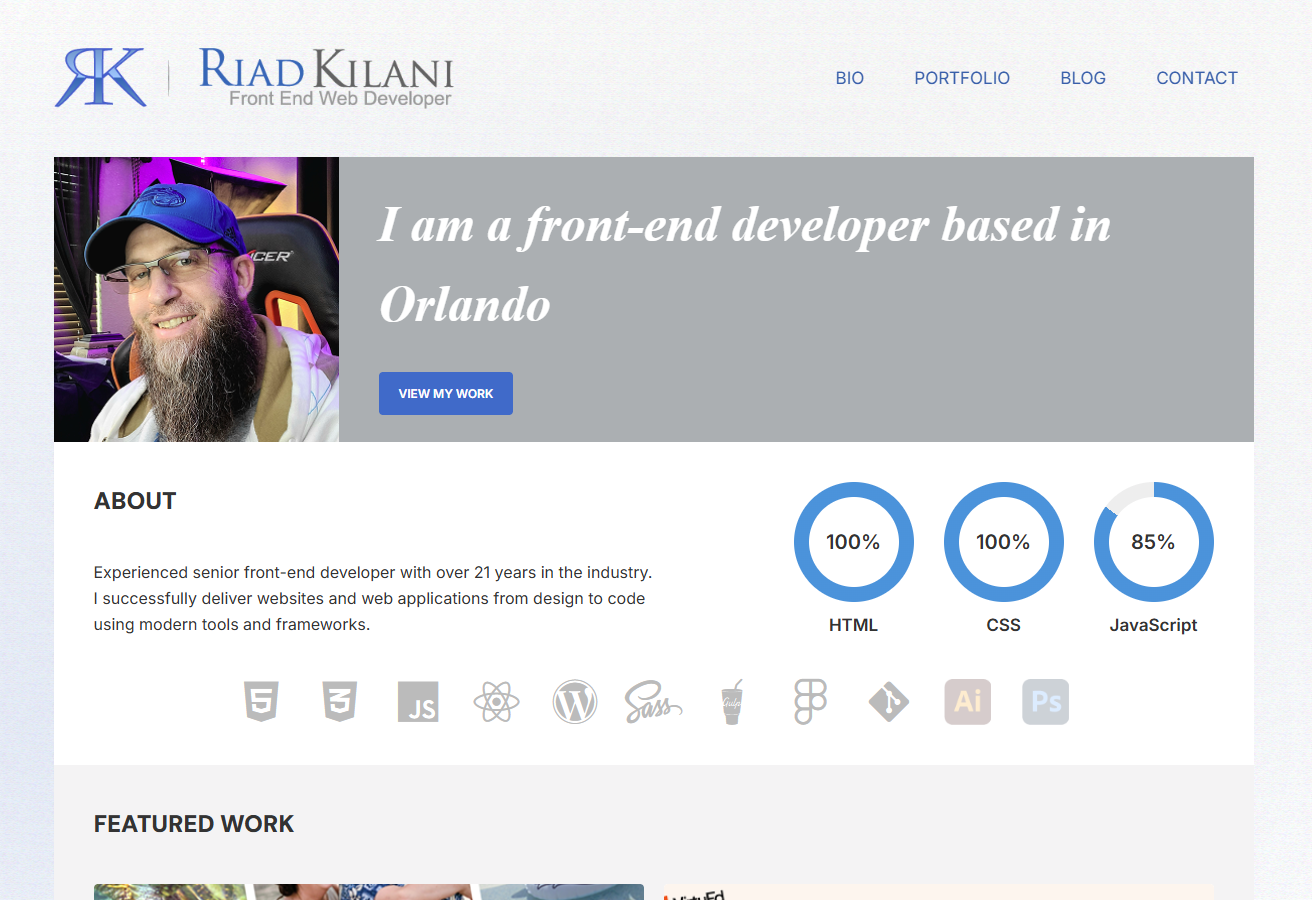
I didn’t want “just a portfolio.” I wanted something I could grow—a place to show both my work and how I work. That became a two-part setup: a vanilla-JS Single Page App (SPA) for the portfolio and a custom WordPress site for the blog. They run independently, but feel like one product. This is just a brief overview. Not all code shown is exact and is just to display for the article.
Why this approach works: the SPA stays fast and interactive, while WordPress makes publishing long-form content simple and great for SEO. Best of both worlds.
The Plan (in plain English)
- Show real engineering: clean code, smart structure, and reliable performance
- Make life easier later: components, shared tokens, a single build pipeline
- Delight users: smooth motion, quick loads, consistent UI
- Be inclusive: accessibility from day one
- Stay cohesive: portfolio + blog look and feel like the same brand
Two Sites, One Experience
- riadkilani.com (SPA): vanilla JavaScript, component-based, smooth transitions
- blog.riadkilani.com (WordPress): custom theme, easy publishing, SEO-friendly
What this buys me:
Performance isolation, safer publishing (content without touching app code), independent scaling, and the right tool for each job.
Inside the SPA (vanilla JS)
I kept the SPA lean but structured like a framework app.
riadkilani.com/
├─ components/   # home, bio, portfolio, contact (HTML/JS/SCSS per view)
├─ scss/         # tokens, base, typography, style.scss
├─ js/           # app.js, router.js, script.js
└─ assets/       # images, fonts
The tiny router (human-sized, no framework):
function loadPage(page) {
  fadeOutContent(() => {
    fetch(`components/${page}/${page}.html`)
      .then(res => res.text())
      .then(html => {
        const main = document.getElementById('main-content');
        main.innerHTML = html;
        document.title = page[0].toUpperCase() + page.slice(1) + ' – Riad Kilani';
        loadPageScript(page);
        fadeInContent();
      })
      .catch(() => main.innerHTML = '<p>Page not found.</p>');
  });
}
Why it matters: faster navigation, page-specific scripts, and SEO-friendly hash URLs—without dragging in a big framework.
The Blog (custom WordPress theme)
The blog keeps writing and organization simple, while staying on-brand.
wp-content/themes/blog/
├─ index.php • single.php • page.php • archive.php
├─ header.php • footer.php • sidebar.php • functions.php
├─ scss/  (_variables.scss, _base.scss, _layout.scss, _widgets.scss, _syntax-highlight.scss, _responsive.scss)
├─ js/    (main.js, main-vanilla.js)
└─ assets/images/
Helpful touches:
- REST add-on: expose featured image URLs for future integrations
- Auto-pagination: split very long posts into readable chunks
- Widget polish: cleaner tag clouds with counts and better styles
(All custom, lightweight, and easy to maintain.)
One Design System, Two Apps
Both sites use the same SCSS tokens (colors, type, spacing, radii) and a shared Gulp build.
// Tokens (excerpt)
$primary: #2b72c9;
$primary-dark: #217dbb;
$accent: #8e24aa;
$text: #333;
$font-heading: "TrajanProBold", serif;
$font-body: "Inter", sans-serif;
$radius: 8px;
$gap: 1rem;
// gulpfile.js (excerpt)
function styles() {
  return gulp.src('./scss/**/*.scss')
    .pipe(sourcemaps.init())
    .pipe(sass().on('error', sass.logError))
    .pipe(postcss([autoprefixer()]))
    .pipe(cleanCSS())
    .pipe(sourcemaps.write('.'))
    .pipe(gulp.dest('./css'));
}
Why it matters: updates roll out consistently to both sites with one set of tokens and one pipeline. Less drift, less rework.
Navigation on Mobile (with accessibility baked in)
Menu interactions are keyboard-friendly, escape-to-close works, and focus returns to the toggle. Small detail, big UX win.
How I Built It (6 simple phases)
- Plan: map goals, pick SPA vs WP roles, sketch user journeys
- Design system: tokens, components, responsive rules, WCAG 2.1 AA
- Build: SPA components + router; custom WP theme + features
- Test: cross-browser/device, Lighthouse, keyboard/screen reader passes
- Optimize: images, minify, cache, keep plugins lean
- Ship & maintain: Git workflow, docs, regular updates
Challenges → Solutions
- Keeping visuals identical across stacks: shared tokens + patterns
- Flexible WP theme without mess: modular templates, enhanced widgets, REST tweaks
- Performance parity: SPA uses code splitting and lazy images; WP uses caching and fewer plugins
- Consistent mobile UX: same breakpoints and nav patterns in both apps
Shared breakpoints:
$mobile: 480px;
$tablet: 768px;
$desktop: 1024px;
CORS & CSP Headers (challenges and fixes).
Running the SPA on riadkilani.com and WordPress on blog.riadkilani.com surfaced two common gotchas: CORS (fonts, images, and REST calls blocked by default across origins) and a strict CSP that accidentally broke inline scripts/styles from WordPress and some SPA interactions. The fix was to be explicit. For CORS, I returned precise response headers from the WordPress origin—allowing only the portfolio origin, listing the methods/headers I actually use, adding Vary: Origin, and handling OPTIONS preflights. For CSP, I started in Report-Only, then rolled out a policy that whitelists my own domains/CDNs and uses nonces for inline scripts (so WP and small inline inits keep working) while avoiding blanket unsafe-inline. Together, these keep the app secure without breaking legitimate cross-site requests.
Minimal header examples (optional):
Apache (.htaccess on blog.riadkilani.com)
# CORS Headers for Cross-Origin Resource Sharing
<IfModule mod_headers.c>
    # Remove any existing CORS headers first
    Header unset Access-Control-Allow-Origin
    Header unset Access-Control-Allow-Methods
    Header unset Access-Control-Allow-Headers
    Header unset Access-Control-Allow-Credentials

    # Set specific CORS headers for allowed origins - all domain variations
    SetEnvIf Origin "^https://www\.riadkilani\.com$" ALLOW_ORIGIN=1
    SetEnvIf Origin "^https://riadkilani\.com$" ALLOW_ORIGIN=1

    # Set headers dynamically based on origin
    Header set Access-Control-Allow-Origin "%{HTTP_ORIGIN}e" env=ALLOW_ORIGIN
    Header set Access-Control-Allow-Methods "GET, POST, OPTIONS" env=ALLOW_ORIGIN
    Header set Access-Control-Allow-Headers "Content-Type, Authorization, X-Requested-With" env=ALLOW_ORIGIN
    Header set Access-Control-Allow-Credentials "true" env=ALLOW_ORIGIN
    Header always set Referrer-Policy "strict-origin-when-cross-origin"

    # Allow font loading from any origin
    <FilesMatch "\.(woff|woff2|ttf|eot)$">
        Header set Access-Control-Allow-Origin "*"
    </FilesMatch>
WordPress CSP with nonces (functions.php on blog.riadkilani.com)
add_action('send_headers', function () {
  // Generate a per-request nonce
  $nonce = base64_encode(random_bytes(16));

  // Store it (so we can attach to enqueued <script> tags)
  $GLOBALS['csp_nonce'] = $nonce;

  header("Content-Security-Policy: ".
    "default-src 'self'; ".
    "script-src 'self' 'nonce-{$nonce}' https://riadkilani.com; ".
    "style-src 'self' 'unsafe-inline'; ".
    "img-src 'self' data: https:; ".
    "font-src 'self' https://riadkilani.com; ".
    "connect-src 'self' https://riadkilani.com https://blog.riadkilani.com; ".
    "frame-ancestors 'self'; object-src 'none'; base-uri 'self';");
});

// Attach the nonce to all enqueued scripts
add_filter('script_loader_tag', function ($tag) {
  if (!empty($GLOBALS['csp_nonce'])) {
    $tag = str_replace('<script ', '<script nonce="'.$GLOBALS['csp_nonce'].'" ', $tag);
  }
  return $tag;
}, 10, 1);
Tips:
• Prefer an exact origin over*(especially if you use credentials).
• AddAccess-Control-Max-Ageto cache preflights if needed.
• Start CSP inReport-Onlyto collect violations, then enforce.
• Replace remaining inline scripts/styles with nonced or external files over time.
Results (current test numbers)
- Portfolio (SPA): Perf ~96, FCP ~1.2s, LCP ~2.1s, CLS ~0.08, TTI ~2.3s
- Blog (WP): Perf ~92, Mobile ~89, SEO ~97, Accessibility ~95
- Together: ~98% visual consistency, <500ms load-time variance, unified navigation
(Numbers will evolve as I keep tuning, but the baseline is strong.)
What This Shows
- Frontend: HTML/CSS/JS (ES6+), SCSS, components, routing, responsive design
- Backend (WP): PHP, hooks/filters, REST, performance-aware choices
- Tooling: Gulp, PostCSS/Autoprefixer, asset optimization, Git
- UX & Design: systems thinking, motion, accessibility, prototyping
- PM: documentation, analytics, integration strategy, iteration
What’s Next
- SPA: PWA features, richer Web Animations, TypeScript, Vite/Webpack
- Blog: optional headless routes, ACF layouts, i18n, deeper analytics
- Cross-app: unified API, global search, end-to-end analytics, CI/CD
Leave a Reply